Redesigning class lessons to reduce cognitive overload for students
Redesigning class lessons to reduce cognitive overload for students
Redesigning class lessons to reduce cognitive overload for students
Pandai
Pandai
TEAM
TEAM
Amir Ali / Product Manager
Wahidin Aji / Software Engineer
Amir Ali / Product Manager
Wahidin Aji / Software Engineer
Amir Ali / Product Manager
Wahidin Aji / Software Engineer
ROLE
ROLE
Product Designer
Product Designer
Product Designer
DURATION
DURATION
4 Months
4 Months
PROBLEM
PROBLEM
Overwhelm and hard-to-read lessons
Lessons felt overwhelming because many topics were placed on a single long scrolling page. The amount of content made it difficult for students to stay focused and understand what to learn first.
Disjointed learning experience
Images, text, and videos feel disconnected, and many elements were too small to view comfortably. The app also opened the “Notice Board” tab by default instead of the main “Class Lesson” tab, causing students to miss the core content and disrupting the learning flow.
Overwhelm and hard-to-read lessons
Lessons felt overwhelming because many topics were placed on a single long scrolling page. The amount of content made it difficult for students to stay focused and understand what to learn first.
Disjointed learning experience
Images, text, and videos feel disconnected, and many elements were too small to view comfortably. The app also opened the “Notice Board” tab by default instead of the main “Class Lesson” tab, causing students to miss the core content and disrupting the learning flow.
Overwhelm and hard-to-read lessons
Lessons felt overwhelming because many topics were placed on a single long scrolling page. The amount of content made it difficult for students to stay focused and understand what to learn first.
Disjointed learning experience
Images, text, and videos feel disconnected, and many elements were too small to view comfortably. The app also opened the “Notice Board” tab by default instead of the main “Class Lesson” tab, causing students to miss the core content and disrupting the learning flow.
OUTCOME
OUTCOME
Students can now learn from a clear, dedicated lesson page with organized topics and properly sized media, making lessons easier to follow.
Content feels less overwhelming as the layout have better visual hierarchy, better structured, and no longer split across multiple confusing tabs.
Students can review past lessons more easily as they can move through the learning content set by their tutors without getting lost.
Teachers receive fewer support questions, as the new design helps students navigate and explore lessons independently.
Students can now learn from a clear, dedicated lesson page with organized topics and properly sized media, making lessons easier to follow.
Content feels less overwhelming as the layout have better visual hierarchy, better structured, and no longer split across multiple confusing tabs.
Students can review past lessons more easily as they can move through the learning content set by their tutors without getting lost.
Teachers receive fewer support questions, as the new design helps students navigate and explore lessons independently.
Students can now learn from a clear, dedicated lesson page with organized topics and properly sized media, making lessons easier to follow.
Content feels less overwhelming as the layout have better visual hierarchy, better structured, and no longer split across multiple confusing tabs.
Students can review past lessons more easily as they can move through the learning content set by their tutors without getting lost.
Teachers receive fewer support questions, as the new design helps students navigate and explore lessons independently.
FINAL DESIGN
FINAL DESIGN
Class lesson interface redesigned
Class lesson interface redesigned
Class lesson interface redesigned
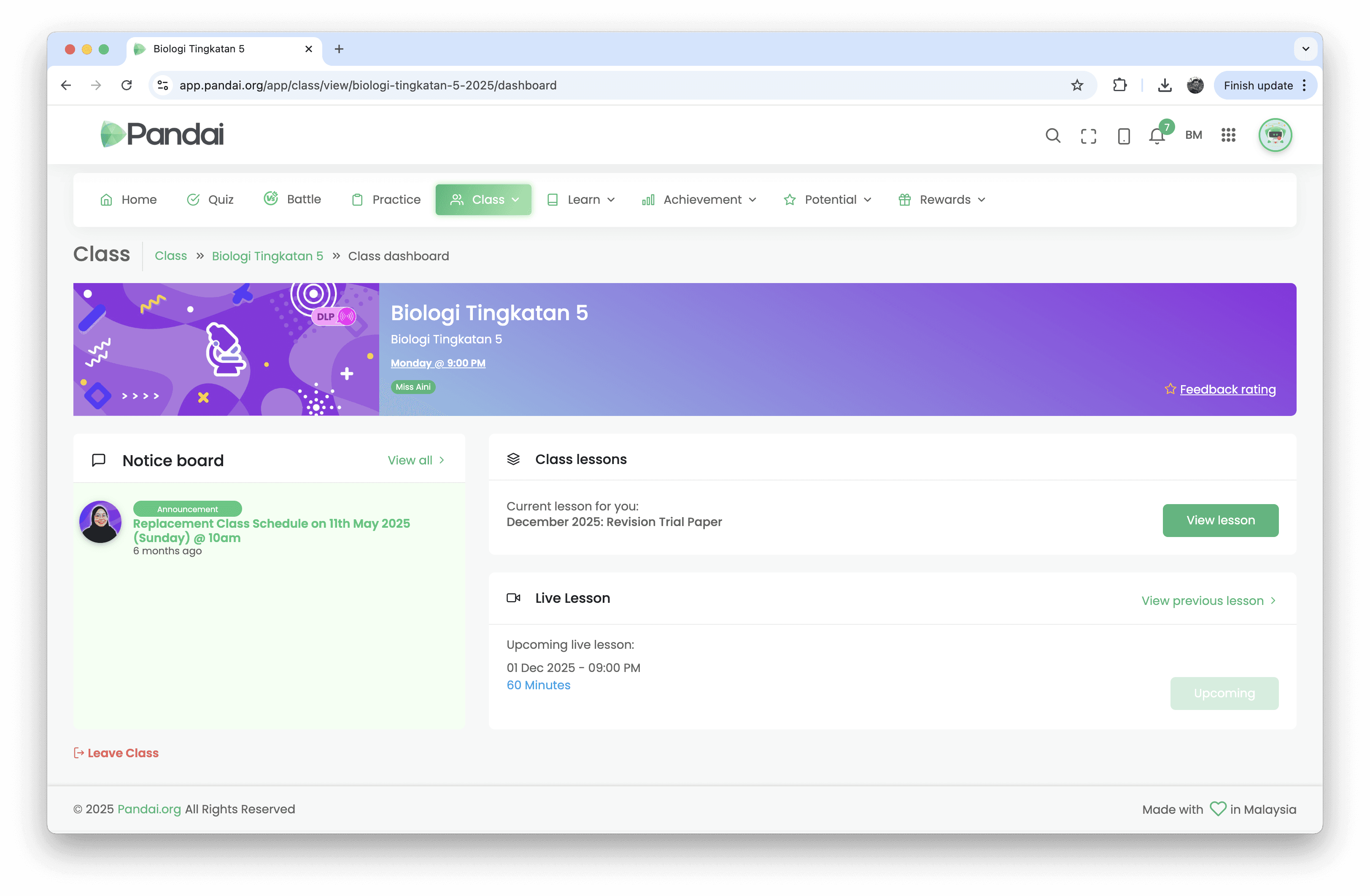
The previous “Learning Module” was redesigned and renamed to “Class Lesson” to make its purpose clearer and more intuitive for students.
Lesson content is now organised into clear, logical sections, giving students a structured flow and reducing cognitive load.
All media(ie. images, PDFs, text, and video) is displayed at readable, accessible sizes and making content easier to digest.
Content is split into smaller, manageable chunks, reducing long scrolling and helping students stay focused.
Each topic has a completion indicator, making it easier for students to review past lessons and track their progress.
The previous “Learning Module” was redesigned and renamed to “Class Lesson” to make its purpose clearer and more intuitive for students.
Lesson content is now organised into clear, logical sections, giving students a structured flow and reducing cognitive load.
All media(ie. images, PDFs, text, and video) is displayed at readable, accessible sizes and making content easier to digest.
Content is split into smaller, manageable chunks, reducing long scrolling and helping students stay focused.
Each topic has a completion indicator, making it easier for students to review past lessons and track their progress.
The previous “Learning Module” was redesigned and renamed to “Class Lesson” to make its purpose clearer and more intuitive for students.
Lesson content is now organised into clear, logical sections, giving students a structured flow and reducing cognitive load.
All media(ie. images, PDFs, text, and video) is displayed at readable, accessible sizes and making content easier to digest.
Content is split into smaller, manageable chunks, reducing long scrolling and helping students stay focused.
Each topic has a completion indicator, making it easier for students to review past lessons and track their progress.
Class dashboard
Class dashboard
Class dashboard
Replaces the old tab-based navigation, which previously made it unclear for students to begin their lessons.
Brings all key actions (Class Lessons, Notice Board, Live Lessons) into one place for easier access.
Reduce the number of steps to help the students to start lessons faster and find resources easily.
Replaces the old tab-based navigation, which previously made it unclear for students to begin their lessons.
Brings all key actions (Class Lessons, Notice Board, Live Lessons) into one place for easier access.
Reduce the number of steps to help the students to start lessons faster and find resources easily.
Replaces the old tab-based navigation, which previously made it unclear for students to begin their lessons.
Brings all key actions (Class Lessons, Notice Board, Live Lessons) into one place for easier access.
Reduce the number of steps to help the students to start lessons faster and find resources easily.
IMPACTS

OUTCOMES
IMPACTS
IMPACTS
SOLUTIONS
SOLUTIONS
Introduced a clear topic structure
Introduced a clear topic structure
Introduced a clear topic structure
❌
❌
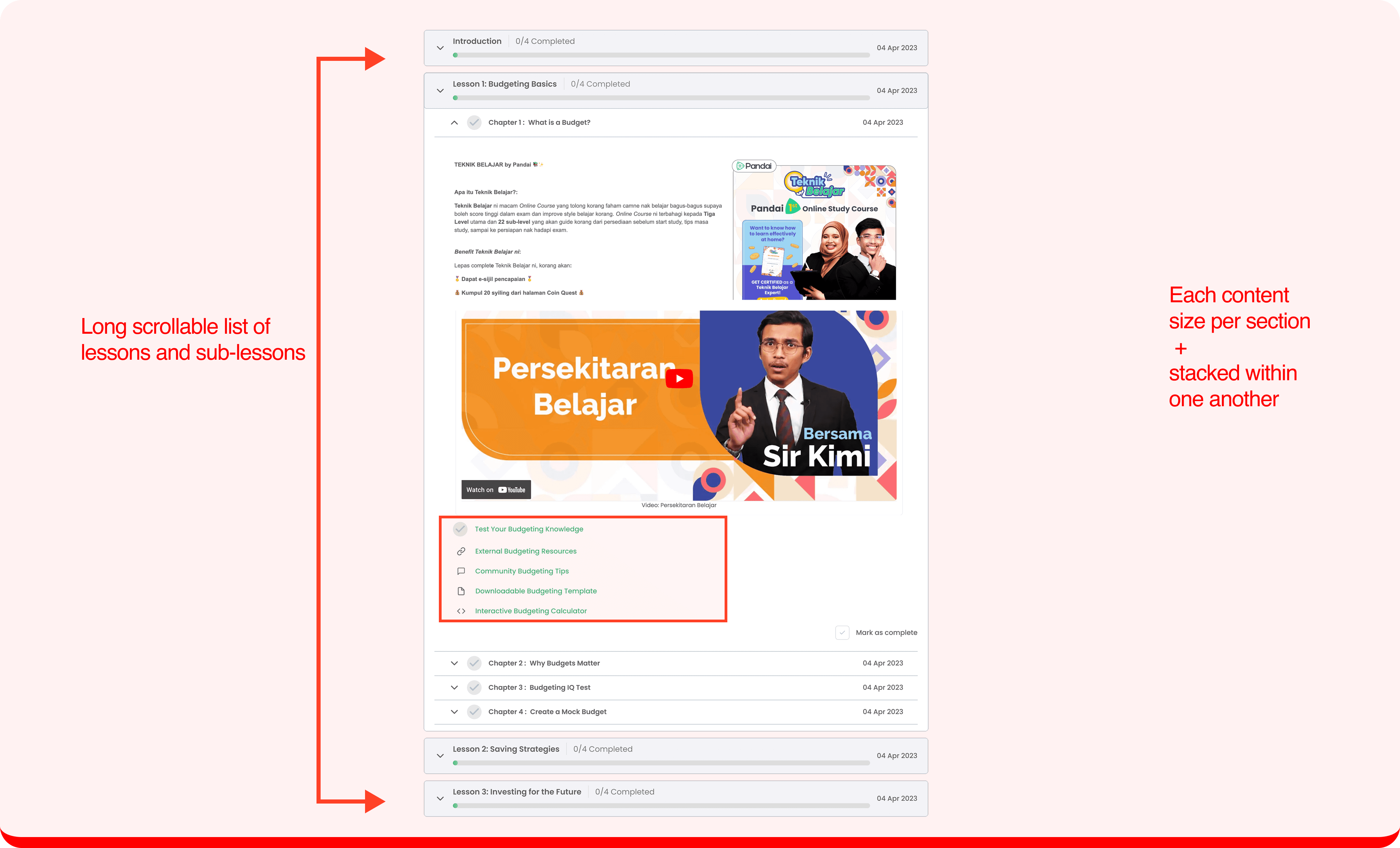
Content was presented as a long scrolling page with mixed text, videos, and links stacked together. Lessons lacked a clear structure, making it difficult for students to understand the flow, stay oriented, or find specific topics..
✅
✅
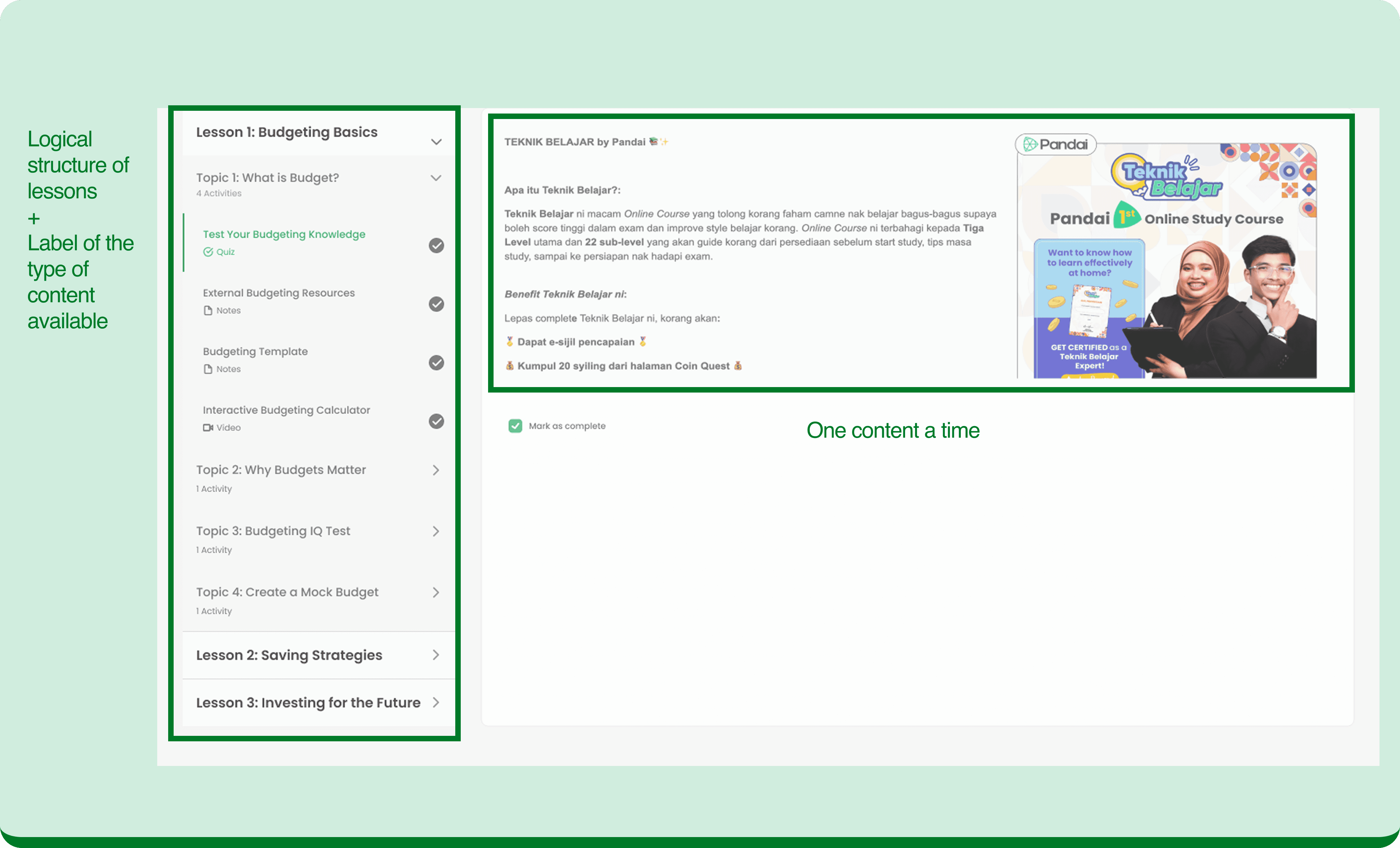
Lessons are now organized into clear topic sections, with one piece of content displayed at a time. This structured layout improves readability, reduces cognitive load, and helps students navigate the material more confidently and review past lessons with ease.
Improved dashboard content & visual hierarchy
Improved dashboard content & visual hierarchy
Improved dashboard content & visual hierarchy
❌
❌
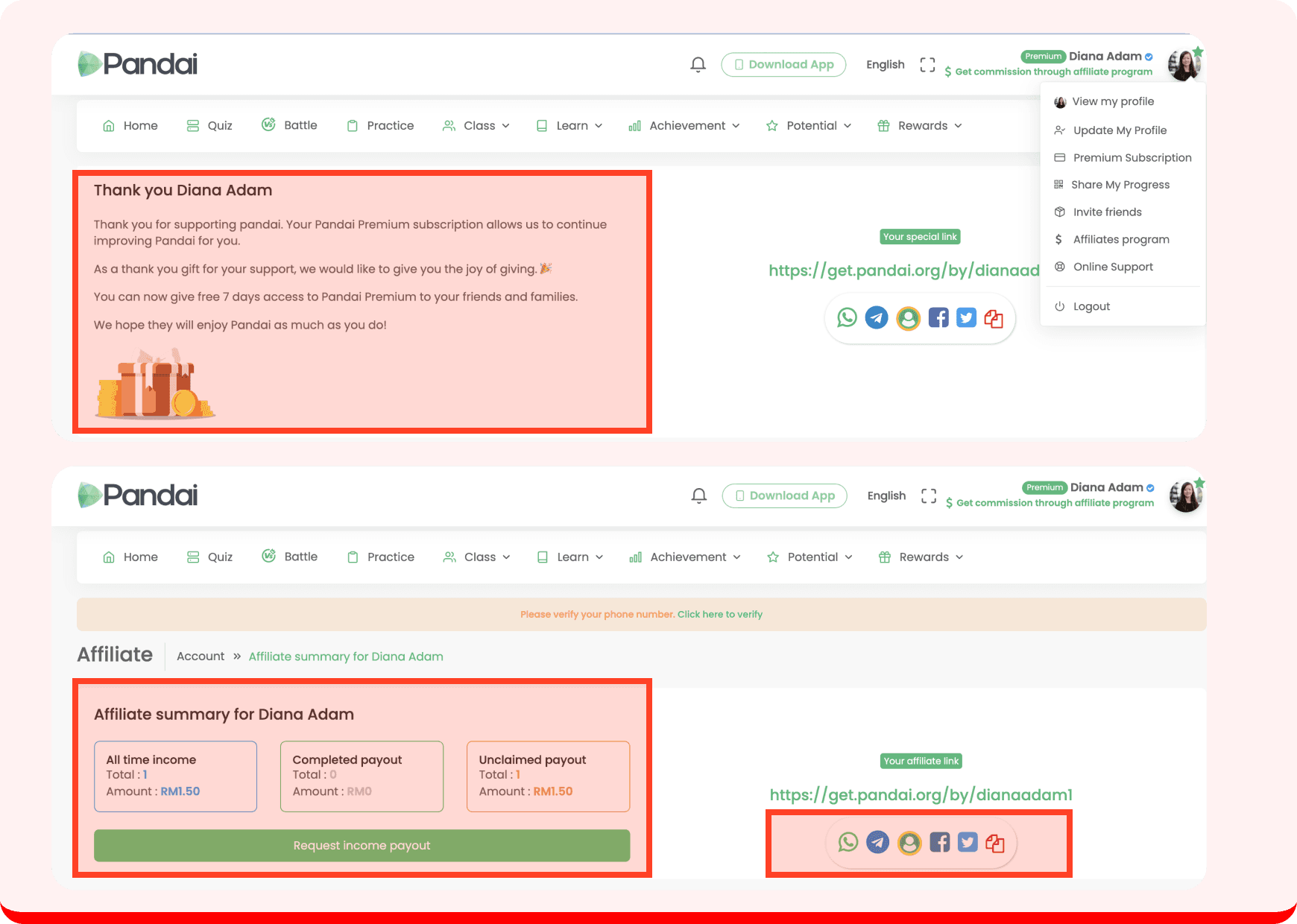
The UX writing not clearly reflect how referral and affiliate features worked, and the visual hierarchy made content hard to follow.
The earnings summary displayed unnecessary information and used terms like “payout,” which not appropriate for intended audience.
Too many sharing link options which can overwhelmed users and included platforms they were unlikely to use such as “Google Classroom".
The UX writing not clearly reflect how referral and affiliate features worked, and the visual hierarchy made content hard to follow.
The earnings summary displayed unnecessary information and used terms like “payout,” which not appropriate for intended audience.
Too many sharing link options which can overwhelmed users and included platforms they were unlikely to use such as “Google Classroom".
The UX writing not clearly reflect how referral and affiliate features worked, and the visual hierarchy made content hard to follow.
The earnings summary displayed unnecessary information and used terms like “payout,” which not appropriate for intended audience.
Too many sharing link options which can overwhelmed users and included platforms they were unlikely to use such as “Google Classroom".
✅
✅
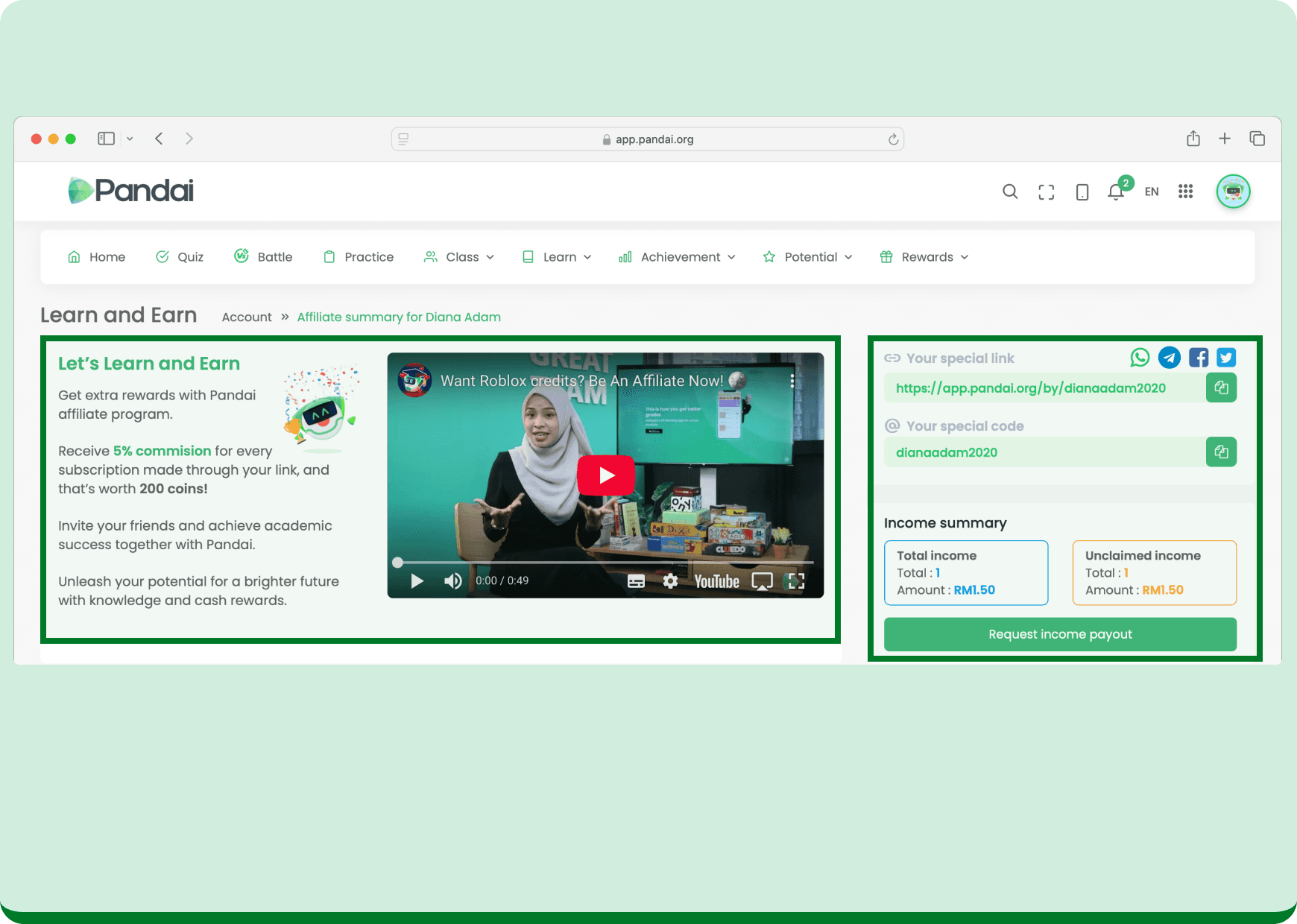
The copy was rewritten to highlight benefits of the feature, and short explainer video was added to help users quickly understand how it works.
Invitation options and earnings summary were grouped together to making it easier for users to track their progress and share their links immediately.
Sharing options were narrowed down to the most relevant platforms to reduce clutter and help users focus on taking action.
The copy was rewritten to highlight benefits of the feature, and short explainer video was added to help users quickly understand how it works.
Invitation options and earnings summary were grouped together to making it easier for users to track their progress and share their links immediately.
Sharing options were narrowed down to the most relevant platforms to reduce clutter and help users focus on taking action.
The copy was rewritten to highlight benefits of the feature, and short explainer video was added to help users quickly understand how it works.
Invitation options and earnings summary were grouped together to making it easier for users to track their progress and share their links immediately.
Sharing options were narrowed down to the most relevant platforms to reduce clutter and help users focus on taking action.
Optimised user table list navigation
Optimised user table list navigation
Optimised user table list navigation
❌
❌
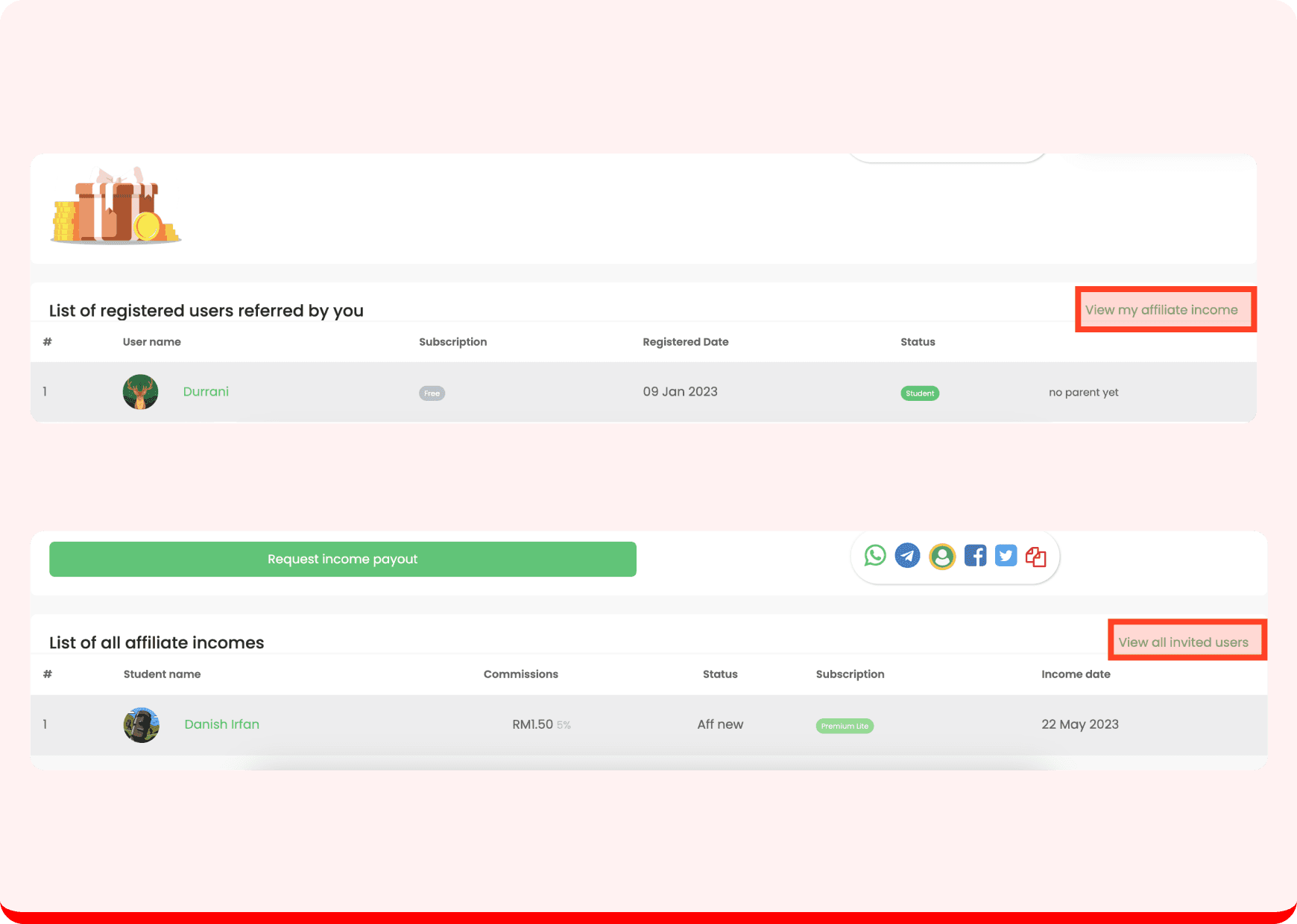
Invited users and affiliate users were shown on separate pages, disrupting the user flow and making it harder to track progress in one place.
Invited users and affiliate users were shown on separate pages, disrupting the user flow and making it harder to track progress in one place.
Invited users and affiliate users were shown on separate pages, disrupting the user flow and making it harder to track progress in one place.
✅
✅
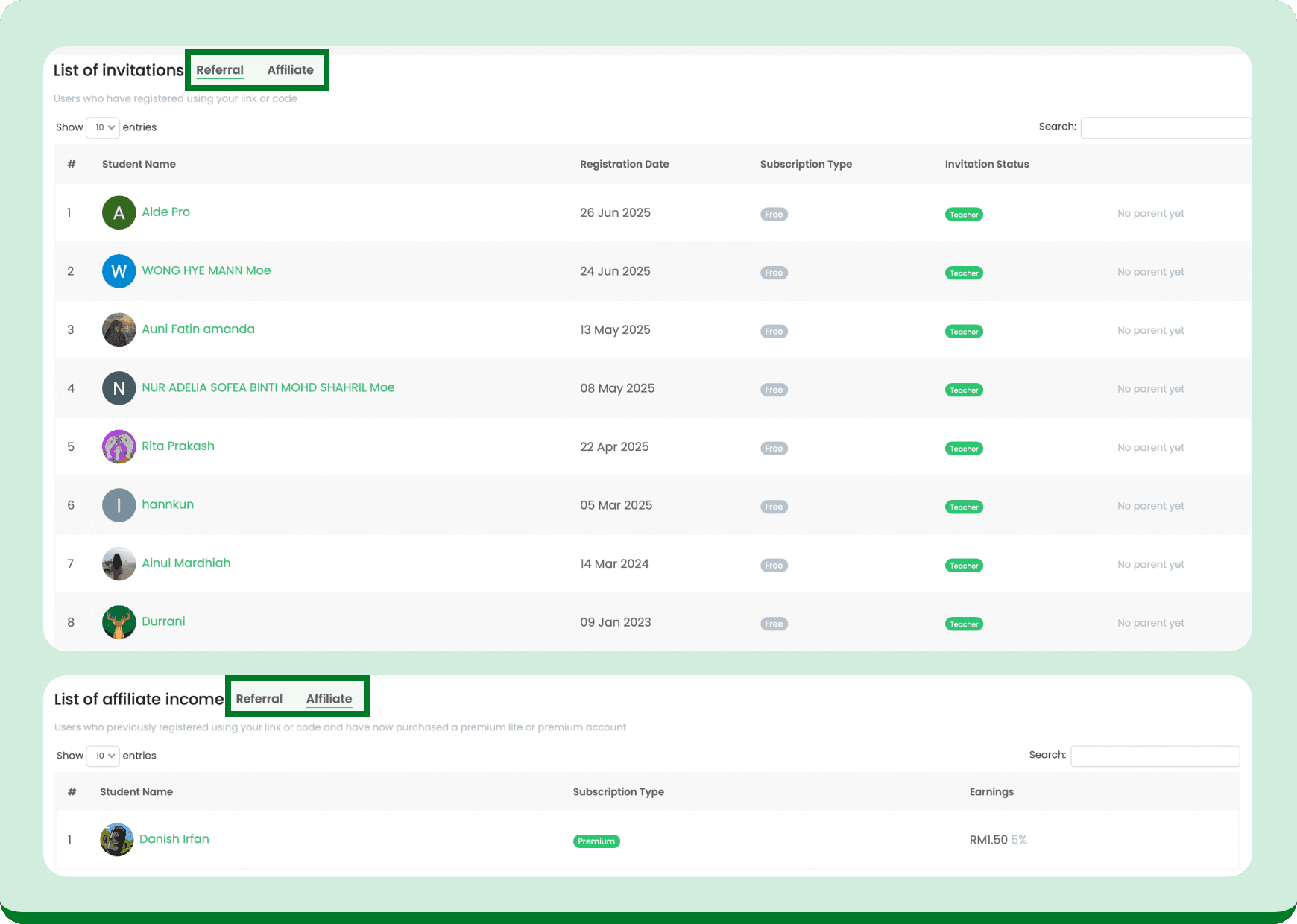
A segmented control interface was added to allow users can easily switch between referral and affiliate lists on the same page, helping them stay focused and track their progress.
A segmented control interface was added to allow users can easily switch between referral and affiliate lists on the same page, helping them stay focused and track their progress.
A segmented control interface was added to allow users can easily switch between referral and affiliate lists on the same page, helping them stay focused and track their progress.